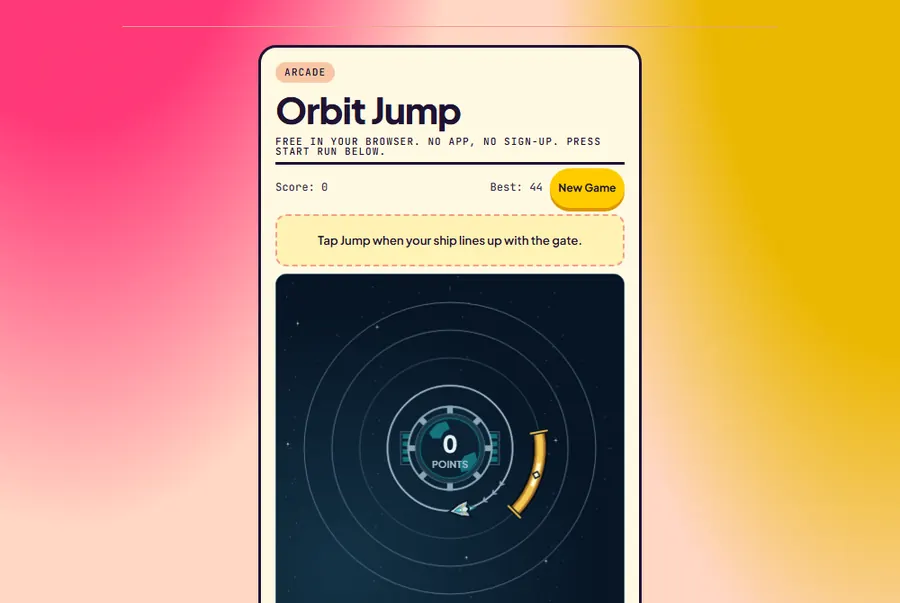
Free in your browser. No app, no sign-up. Press Start run below.
Score: 0Best: 0
Wait for your ship to line up with the gold gate.
Tap the board or press Space. Aim for the gold gate.
Fuel 7.0 sDock 0 / 12
Flight targets & review
Pick one goal for your next real flight. This log stays in this tab; it never changes saved records.
Last flight
↶ marks a direction change after that landing.
Completed in this tab
Experiment between runs. Practice points never enter your records.
Compare a tap now with a tap after your chosen reaction delay. Positive offset means the gate is ahead; negative means you have passed it. This models one jump with the real timing rules.
Purple line: immediate tap. Red dot: delayed tap. Gold band: safe gate. Pale band: perfect center.
How to play Orbit Jump
Orbit Jump is a free timing game you play in your browser. Your ship circles a planet on one of four orbits. A gold gate marks the landing area on the next ring. Start a run, wait until the ship lines up with that gate, then tap Jump, tap the board, or press Space. You can wait another revolution if the timing looks wrong.
Is this the Orbit Jump app?
No. Several phone apps use the name Orbit Jump, and they install from the App Store or Google Play. This one is a separate game built for Play in Phone with the same tap-to-hop idea, and it runs in any modern browser on a phone, tablet or computer. Nothing to install, and your best score stays on this device.
What earns points?
Landing anywhere inside the gold gate earns one point. Hit its white center marker for a perfect landing and two points. A dashed line appears between the ship and the gate while a jump can succeed. Miss the gate and the run ends; Play again starts a fresh attempt straight away.
How does it get harder?
Each successful jump makes the ship a little faster and the gate a little narrower, up to a fixed limit. Travel moves outward through the four rings, then back inward. After every five successful jumps, the ship reverses direction. Watch the ship after a reversal before tapping again.
Three ways to improve your best
Learn the first gate before chasing its center. A safe landing keeps the run alive.
Look at the next ring, not the planet. The gold arc is your landing window.
Use Pause when interrupted. There is no timer penalty for waiting to jump.
Your best score saves in this browser when storage is available. Scores have no cash value, and there are no purchases or paid continues. After a run, Challenge a friend opens your device's share options or copies a link; nothing is posted automatically. Prefer another quick game? Try Reaction Tap, Sky Flap, or browse the arcade games.
Orbit Jump guide
How to play Orbit Jump, and how to stop missing the gate
Orbit Jump is a one-button timing game: your ship circles a planet, a gold gate waits on the next ring, and you tap when the two line up. This guide uses the game's real numbers (gate widths, speeds, the reverse every five jumps, Fuel Flight's refuel values) so you know exactly what you are timing against.
Written from the game's own rules code and checked against real runs on this page. Every screenshot below is from the game above.
How to play Orbit Jump
Press Start run. Your ship begins at the top of the smallest orbit and circles the planet on its own. A gold arc, the gate, sits on the next ring out. Your only job is to jump at the moment the ship is lined up with that gate. You can jump three ways: the big Jump button, a tap anywhere on the board, or the Space bar on a keyboard. All three fire on the press, not on release, so there is no touch delay to compensate for.
A fresh run on a laptop. The ship is on the inner orbit and the gold gate waits on the next ring. Desktop players can keep a finger on Space instead of clicking.
If the ship is inside the gate when you jump, it hops to the gate's ring and a new gate appears further along. If it is outside, the run ends on the spot and the game tells you how far off you were, in degrees, and whether you were early or late. There is no clock in the classic mode: if the timing looks wrong, let the ship go round again. Patience costs you nothing except time.
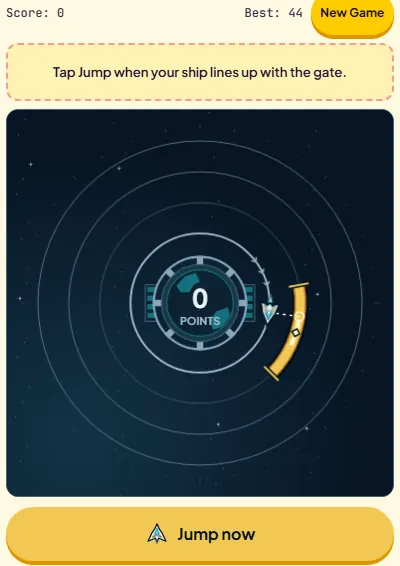
Two on-screen cues help. While a jump would succeed, the button text changes from Jump to Jump now, and a dashed line connects the ship to the gate. Treat those cues as a confirmation, not a trigger: by the time your eyes read the button and your thumb moves, the ship has travelled a little further.
The ship has entered the gate's angle and the button reads "Jump now". Tapping here lands safely; tapping a fraction later, as the ship crosses the white marker, lands perfectly.
The rings and the gate
There are four orbits. A run travels outward one ring per jump, from ring 1 to ring 4, then bounces and works back inward to ring 1, and so on for as long as you survive. The ring you are on never changes the timing: angles, speeds and gate widths are measured in degrees around the planet, so an outer ring is not harder than an inner one, even though the ship looks like it moves faster out there.
The gate is an angle, not a spot on the screen. The safe band and its perfect center both narrow as you land jumps, and the ship flips direction after every fifth landing.
Each new gate is placed ahead of you in your direction of travel, between about 63° and 143° around the circle. Early in a run it lands roughly 140° ahead, and the distance creeps about 1.7° closer with every jump. That has a practical meaning: right after a landing you always have well under half a lap of waiting before the next window opens. You never need to react to a gate that appears right on top of you.
How scoring works
Scoring is simple and has no hidden multipliers:
Safe landing: anywhere inside the gold band earns 1 point.
Perfect landing: the pale center of the gate, which is the middle 28% of the band, earns 2 points.
Miss: the run ends. Nothing is deducted, but nothing more can be added.
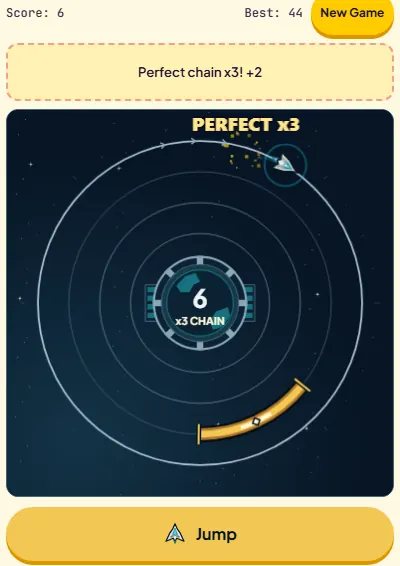
Back-to-back perfect landings build a perfect chain, shown as "Perfect chain x3" and so on. The chain is a record in its own right, saved next to your best score, but it does not multiply points. A perfect landing is worth 2 whether it is your first or your twentieth in a row. One safe landing resets the chain to zero without hurting your score.
Three centers in a row: 6 points from 3 jumps and a chain of 3. A run of safe landings would have scored 3.
That means your score is always between your jump count and double it. A score of 40 might be 40 safe jumps or 20 perfect ones, and the second run is far more impressive, because the gate at jump 20 is a lot narrower than at jump 1. If you are chasing a high score, every perfect landing is literally a free extra jump.
Your best score, longest chain and number of finished runs are saved in this browser on this device. Nothing is uploaded and there is no account. Clearing site data clears the records.
How the difficulty ramps
Every successful jump does two things to the next one: the ship speeds up by about 3.4° per second, and the safe band loses about 0.5° on each side. Both stop at a fixed limit. Speed tops out at jump 25, and the gate stops shrinking at jump 29. From there on the game does not get any harder; it simply keeps asking for the same narrow window.
Orbit Jump timing by number of successful jumps (from the game's difficulty formula)
Jumps landed
Ship speed
One full lap
Safe band
Perfect center
Time inside gate
Time in center
Direction
0
66°/s
5.5 s
±27.5°
±7.7°
835 ms
234 ms
Clockwise
5
83°/s
4.3 s
±24.9°
±7.0°
600 ms
168 ms
Counterclockwise
10
100°/s
3.6 s
±22.3°
±6.3°
446 ms
125 ms
Clockwise
15
117°/s
3.1 s
±19.8°
±5.5°
337 ms
94 ms
Counterclockwise
20
135°/s
2.7 s
±17.2°
±4.8°
255 ms
71 ms
Clockwise
25
149°/s (max)
2.4 s
±14.6°
±4.1°
196 ms
55 ms
Counterclockwise
29 and up
149°/s
2.4 s
±12.6° (min)
±3.5°
169 ms
47 ms
Flips every 5
The column that matters is "time inside gate". At the start you have most of a second. By jump 20 you have a quarter of a second, which is close to the reaction time of most people. That is why runs tend to die in the high teens and low twenties: past that point, reacting to the gate no longer works and you have to anticipate it.
The window shrinks fastest in the first 15 jumps. After jump 29 it is fixed at 169 ms, with a 47 ms center.
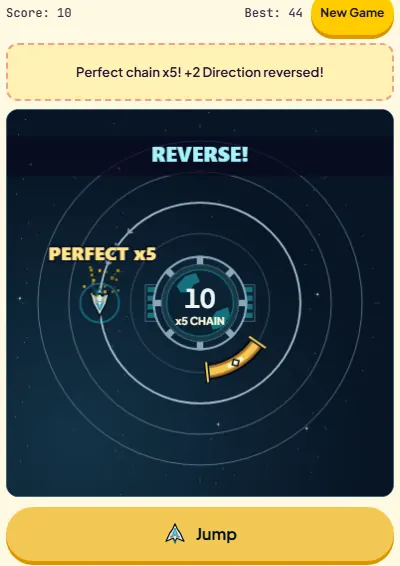
The other twist is direction. After every fifth landing (jumps 5, 10, 15 and so on) the ship reverses, and a "REVERSE!" banner flashes. The new gate is generated in the new direction, so it is still ahead of you. The trap is muscle memory: your eyes have spent five jumps tracking the ship one way.
Jump 5 lands perfectly and the ship turns around. Watch which way it moves before you start counting toward the next gate.
Strategy, from your first run to 30+ jumps
Beginner: survive the first ten
Use the free laps. Classic mode has no timer. If you are unsure, let the ship go round once more. A lap at the start takes about 5.5 seconds, which costs you nothing.
Aim for the middle, accept the edge. Target the white center marker every time. If you hit it, you score 2. If you are slightly off, you are still inside a band that is more than three times wider than the center.
Watch the gate, not the ship. Fix your eyes on the white marker and let the ship come into view. Judging "when will it arrive here" is easier than following a moving object and guessing where the gate starts.
Re-read the direction after jumps 5, 10, 15. Take one beat after the REVERSE banner to see the new direction before you plan the tap.
Intermediate: build a rhythm
Tap slightly early. Your thumb lags your eyes. If you tap the moment the ship touches the center, you will land late. Start the press as the ship reaches the near edge of the pale strip.
Use the miss message. "Too early by 9°" or "Too late by 4°" is precise feedback. If most of your misses are late, shift your tap earlier across the board, not just for the next run.
Do not jump on the first pass when the gate is far. Gates appear 63° to 143° ahead, so the first pass always comes. If something distracted you, the second pass is just as good.
Advanced: past jump 20
Anticipate, do not react. At jump 20 the window is 255 ms. Start the tap based on the ship's approach and speed, not on the moment it enters the gold.
Count beats. Because each new gate sits a predictable distance ahead and the speed only creeps up, consecutive jumps have a similar rhythm. Let it settle into a count, and reset the count after each reverse.
Value centers over speed of play. High scores come from long perfect chains. A clean 30-jump run with mostly centers can pass 50 points; the same run with safe landings stops at 30.
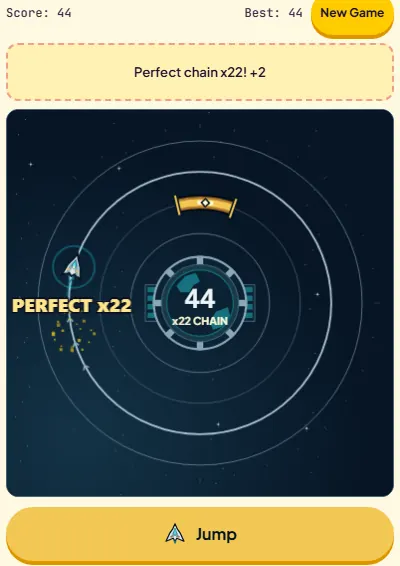
Jump 22, all centers: 44 points and a chain of 22. Compare the narrow gate here to the wide arc in the first screenshot.
Fuel Flight mode
Below the board you can switch from Classic to Fuel Flight. It is a short challenge with a clear finish line: land 12 jumps and you dock. The twist is a fuel tank that burns while you orbit.
You launch with 7.0 seconds of fuel. The tank holds at most 8.0.
Fuel burns one second per second of flight. Pausing stops the burn.
A safe landing refuels 0.5 s. A perfect landing refuels 1.8 s.
Reach 12 landings and the flight ends with "Dock reached!". Run dry or miss and it ends early.
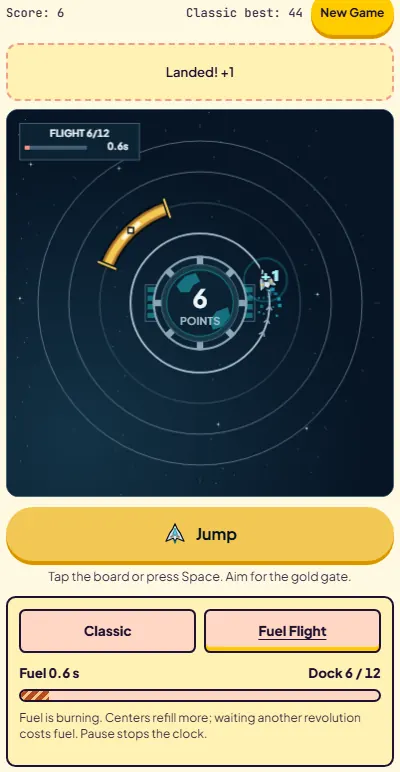
The numbers make the strategy clear. At the start it takes well over a second to reach each new gate, so a safe landing loses fuel overall. In a test flight with nothing but safe landings, the tank was down to 0.6 s after 6 jumps and ran dry before the seventh. With every jump a perfect landing, the same flight docked at 12 with a full 8-second tank. Fuel Flight is really a centers drill with a deadline, and the extra laps that are free in Classic are exactly what drains your tank here.
Six safe landings, 0.6 s of fuel left, 6 of 12 jumps done. Safe landings alone do not cover the burn; centers do.
Fuel Flight results stay in the current tab and never touch your Classic best, chain or run count, so experiment freely. While a run is in progress the mode buttons are locked; finish or reset the run to switch.
Practice tools: Tap Delay Desk and flight targets
Two tools under the game help you practice deliberately. Both are available only between runs.
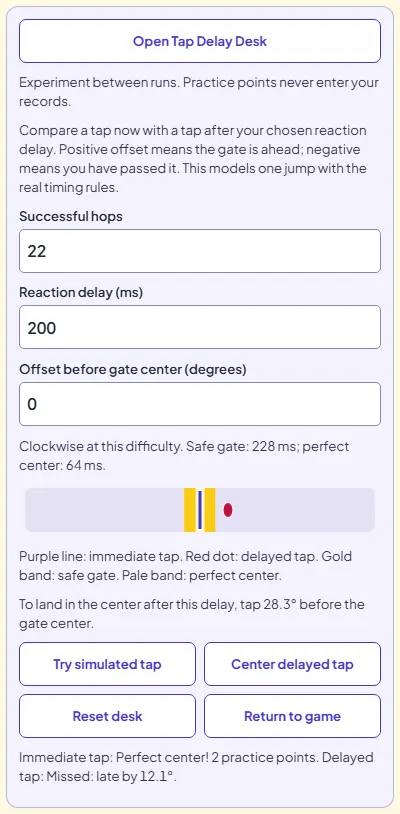
Tap Delay Desk models one jump with the game's real timing rules. You enter a number of successful hops (0 to 500), a reaction delay in milliseconds and how far before the gate center the ship is. It then compares an instant tap with a delayed one and tells you how many degrees early you need to start your tap to land in the center. At 22 hops with a 200 ms delay, for example, it reports a 228 ms safe gate, a 64 ms perfect center, and advises tapping 28.3° before the center. Practice points from the desk never reach your records.
At 22 hops a 200 ms delay carries the ship 28° further, turning a centered tap into a miss "late by 12.1°". The desk tells you how far ahead to start instead.
A useful routine: open the desk after a run, set the hop count to where you died, set the delay to around 200 ms, and press Center delayed tap. The degree figure it gives is the lead you need at that speed. Then play another run with that lead in mind.
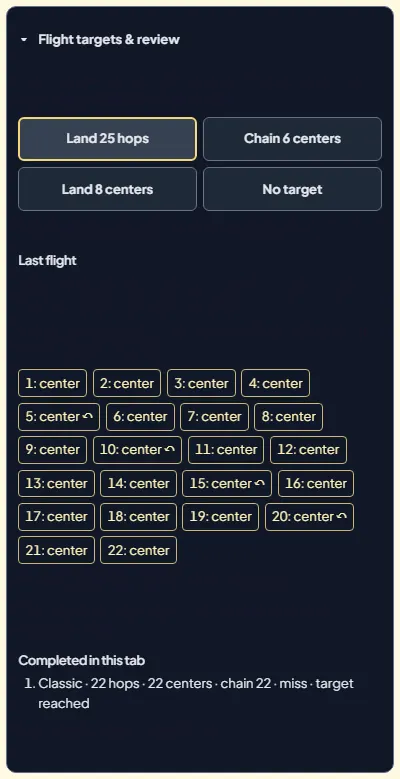
Flight targets & review lets you pick a goal for the next flight: land a set number of hops (the next multiple of 5 after your last run), chain a number of centers in a row, or land a number of centers in total. After the flight, it lists every landing as center, early or late, marks the reverses, and gives advice on your final tap. The last five flights stay listed in the tab.
The review after a 22-jump run: every landing logged, reverses marked, next target suggested as "Land 25 hops".
Common mistakes and how to fix them
Tapping the moment the gate appears. A new gate is always 63° or more away. Wait for the approach. If you are under pressure, a free lap is better than a guess.
Waiting for the "Jump now" label. The button reacts instantly, your eyes and thumb do not. Late in a run the window can close before you finish reading it.
Forgetting the reverse. The first jump after a reverse (the 6th, 11th, 16th and so on) is where muscle memory works against you. Look before you tap.
Restarting with a panic tap. After a miss, taps are ignored for 450 ms, so a late tap does not start a new run by accident. Take that half second to read the miss message.
Chasing chains in Fuel Flight by waiting. Every extra lap burns fuel. Commit to the first good pass.
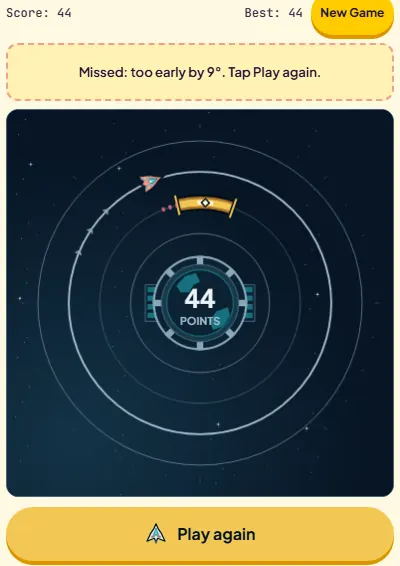
The run that ended at 44 points: "too early by 9°". At jump 22 the safe band is about ±16°, so this tap came 9° before the gold even began.
Orbit Jump FAQ
Is Orbit Jump free, and do I need to download anything?
It is free and runs in the browser on phones, tablets and computers. There is nothing to install and no sign-up.
What are the controls?
Tap the Jump button, tap the board, or press Space. All three jump on the press, so you do not need to wait for the finger to lift.
Do perfect chains multiply my score?
No. A perfect landing is always 2 points and a safe landing 1. The chain is a separate record, saved next to your best score.
Does Orbit Jump ever stop getting faster?
Yes. The ship reaches top speed at jump 25 and the gate reaches its minimum width at jump 29. After that the timing stays the same; only the direction keeps flipping every 5 jumps.
Is there a time limit?
Not in Classic. You can let the ship go round as many times as you like. Fuel Flight has a fuel tank that burns while you orbit.
Where is my high score saved?
In your browser on this device. Best score, longest perfect chain and runs played are kept; Fuel Flight results are not added to them.
Aim for the white center from the first jump, and count a beat after every REVERSE.